
Taking action
Learn how to take common actions.
How do I reset my Benefits OnLine password?
Select Forgot password on the Benefits OnLine log‑in page and follow the prompts. You might need to verify your identity using your contact information, so it's important to keep it up to date.
How do I update my contact information?
On Benefits OnLine, go to Profile & Settings to review and update your phone number, email address, and other contact information. To update contact information for your Merrill brokerage account, access your brokerage account and select Go to MyMerrill, then go to Your Account > Personal Information.
Keeping your information current helps ensure you receive account notifications and security communications. You can also set up multi-factor authentication to receive a security code when you sign in to Benefits OnLine.
TIP
Your contact information is used to verify your identity, send security codes, and deliver important updates and communications, so be sure to keep your email and phone number current.
How can I track my recent activity and next steps?
If an award is being delivered—or was recently delivered—you’ll see a link to Recent Vesting & Delivery on Benefits OnLine. This section shows what vested, what was delivered after taxes, and the amount deposited into your brokerage account, along with suggested next steps and helpful resources.
Because taxes may be withheld or shares sold automatically at vesting, the number of shares delivered to your account may be lower than your total vested units.
You can also view upcoming vesting dates and pending activity on Benefits OnLine on the Your Awards page.
TIP
There is typically a short processing period—a couple of days—between vesting and delivery to your brokerage account.
How do I exercise stock options or stock appreciation rights (SARs)?
If your awards are vested and within the exercise period, you can model potential outcomes and, if eligible, submit an exercise request on Benefits OnLine. Modeling allows you to estimate the value of your award and, for some award types, the taxes that may apply before you exercise. Once you're ready, follow the prompts to review and submit your transaction.
See how it's done. View step-by-step instructions.
How do I sell shares?
On Benefits OnLine, you can choose to sell a specific number of shares or select which tax lots are included in the transaction. You can sell shares using:
Market order
Shares are sold at the next available price.
Limit order
You set the sale price. Shares are sold if the market reaches that price (subject to market conditions). The order is cancelled if that price isn’t met while the order is in effect.
Limit orders can be:
Day limit
Expires at the end of the trading day.
Good till cancelled
Remains active for 180 calendar days.
If you sell all your shares, don’t close your brokerage account—future award proceeds will be deposited into it. You may receive partial execution of the sale order you place, resulting in only a portion of your shares being sold. Once your order has been entered, you should check the confirmation on Benefits OnLine to determine the number of shares sold.
See how it's done. View step-by-step instructions.
TIP
During a blackout period, you can’t buy or sell company stock. Blackout periods are set by your company and may change.
How do I reinvest dividends?
If your company pays dividends, you can choose how they’re handled for shares in your brokerage account:
Cash (default)
Dividends are deposited into your account.
Cash gives you immediate access to the funds.
Dividend reinvestment
Dividends are used to buy additional shares.
Reinvesting dividends increases your share ownership.
See how it's done. View step-by-step instructions.
How do I transfer company stock to my Merrill brokerage account?
If you hold company stock from your equity plan at another financial institution, you may be able to transfer it to your Merrill brokerage account. Keeping your shares in one account can make them easier to manage and track. Contact the financial institution that holds the shares to determine whether a transfer is available and what information is required. You'll typically need your Merrill brokerage account number and the number of shares you want to transfer, as well as Merrill’s DTC number (8862).
How do I deposit funds into my brokerage account?
You may need to deposit funds into your brokerage account—for example, to exercise stock options using a cash purchase or to pay award‑related taxes in cash. Your account must be open and active.
You can typically deposit funds by check or wire transfer. Allow enough time for funds to be received and credited to your account before any deadlines. Contact Merrill for details.
How do I set up direct deposit? (U.S. financial institutions)
By linking a bank account to your Benefits OnLine account, you can transfer cash from stock sales, dividends, or other proceeds to your bank account.
To set up direct deposit, link a bank account in Benefits OnLine under Profile & Settings > Manage Linked Accounts > Link accounts. If you have an account at Bank of America, you may see this listed as an option.
Some accounts can be verified instantly, allowing you to schedule transfers right away. Others may require additional verification and small trial deposits. After the deposits have been sent, you’ll receive an email with instructions. Once verified, you can schedule transfers between accounts.
How do I set up wire instructions? (U.S. and non-U.S. financial institutions)
Wire instructions allow you to transfer cash from your brokerage account to a bank account that may not be linked for direct deposit. On Benefits OnLine, select Brokerage/Sell Shares > Wire Instructions. You'll need your financial institution's routing number (ABA for U.S. accounts, SWIFT for non-U.S. accounts). Once confirmed, the form will auto-populate. Review and complete any missing details before submitting.
In some circumstances, you may need to contact Merrill to set up wire instructions.
How do I certify my tax status?
Certifying your tax status helps ensure taxes are reported and withheld appropriately. On Benefits OnLine, select the To Do reminder to certify your tax status and complete or update your tax form.
See how it's done. View step-by-step instructions in your language for completing Form W‑8BEN.
TIP
An incomplete or outdated address may affect your tax form status, so be sure your address is up to date.
See how it's done. View step-by-step instructions.
What tax documents might I receive?
If your awards vest, are exercised, or you sell company stock, you may receive tax documents such as a W‑2 from your employer and a 1099‑B from Merrill. The forms you receive depend on your award activity during the year.
Where can I find my tax statements?
On Benefits OnLine, select your plan name, then Brokerage/Sell Shares > MyMerrill Statements and Documents. You’ll be taken to MyMerrill.
At the top of the page, choose the account you want to view. Select Tax Documents to see your Tax Reporting Documents by year. Selecting a document opens a PDF, or you can check the boxes next to the statements and select Download statements.
TIP (U.S. Participants)
Taxes withheld at vesting are reported on your W‑2. Your 1099‑B shows details of the sale, so the amounts may not match.
Where can I find the grant agreement?
Your grant agreement includes details about your award, such as vesting schedules, expiration dates, performance requirements (if applicable), and other terms of your award.
Not all companies make grant agreements available on Benefits OnLine. If you can't find your grant agreement, contact your company for more information.
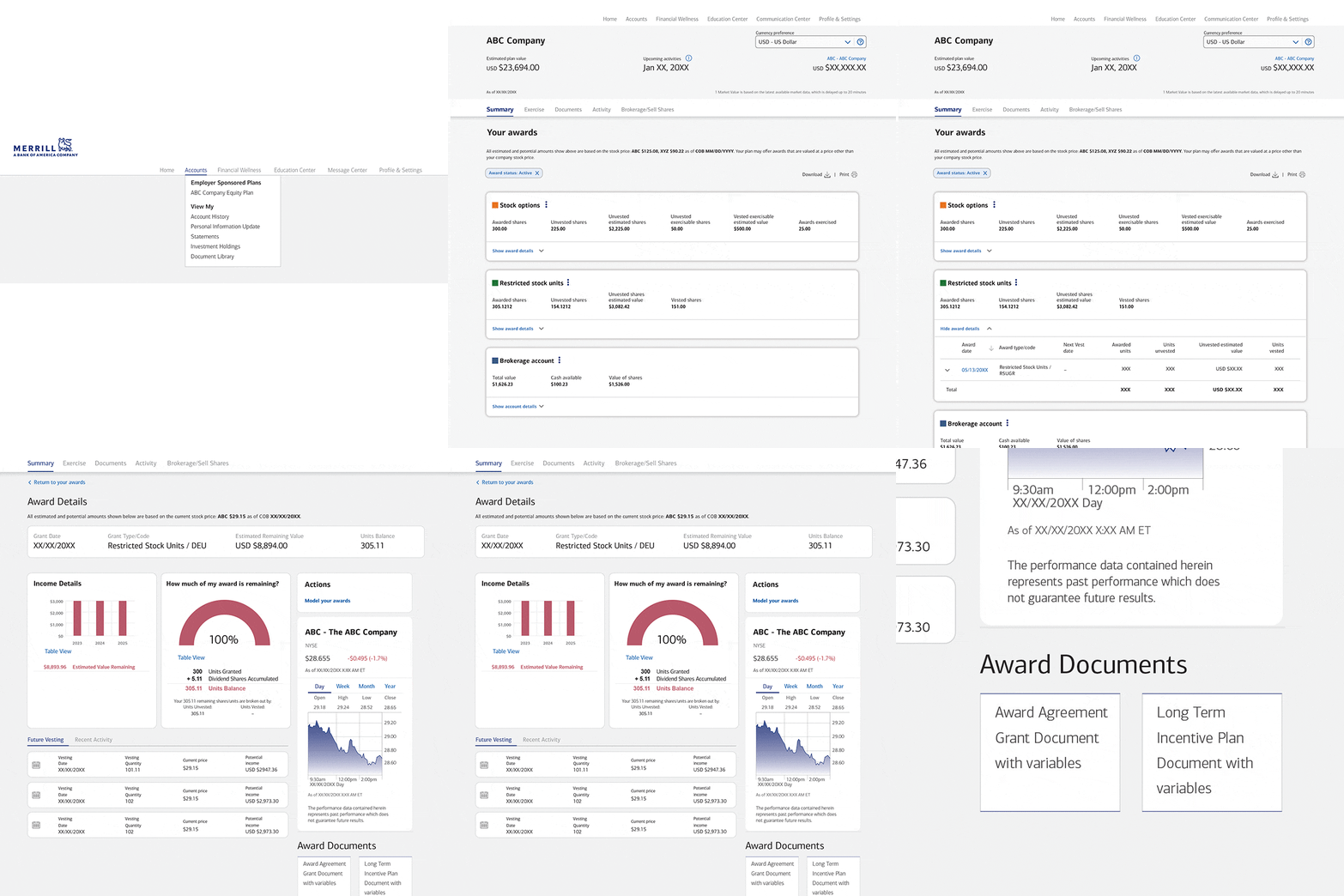
On Benefits OnLine, select your plan’s name to go to the Your Awards page. Select Show award details, then choose an award date to open the Award Details page. Scroll to the Award Documents section.
How-to Guides
Manage your awards with step-by-step instructions
Open your brokerage account

Any transactions in connection with your plan in your Merrill brokerage account are subject to the terms and conditions of that account. This material does not constitute an offer or invitation to buy any securities. Any offer to buy securities from your company would be made only by a prospectus in accordance with the Securities Act of 1933 as amended, and all applicable laws.