
Getting started with your equity awards
Take a few simple steps to get ready to manage your awards.
View and manage your awards on Merrill’s Benefits OnLine. Create your User ID and password by selecting the links on the log-in page and following the prompts, or sign in if you already have them.
See how it's done. View step-by-step instructions.
TIP
Download the Benefits OnLine app for on‑the‑go access to your awards.* Just scan the code with your mobile device to download the app.

Open your Merrill brokerage account
You need this account to receive payouts from your awards. Activation may take up to 72 hours, so don’t delay! You’ll be prompted to open the account when you set up your Benefits OnLine access, or you’ll see a To Do reminder after you log in.
See how it's done. View step-by-step instructions for U.S. participants or non-U.S. participants.
TIP
This is a Limited Individual Investor Account (LIIA), a self-directed, non-interest-bearing brokerage account used to hold and sell shares from your equity awards. You can’t use it to purchase other stocks. If you have company stock from an equity award at another financial institution, you can transfer it to this account for ease of access.
Certify your tax status
When you open your brokerage account, you’ll be prompted to complete either a Form W-9 (U.S. citizens and residents) or a Form W-8BEN (non-U.S. citizens or non-residents). If you don’t complete this form, you’ll be subject to a mandatory U.S. federal income tax backup withholding of 24%.
See how it's done. View step-by-step instructions for Form W-8BEN.
Accept your award (if required)
You’ll see a To Do reminder on Benefits OnLine if action is needed. Be sure to review the terms and conditions of your award before accepting it.
See how it's done. View step-by-step instructions.
Set up online delivery of communications
Stay connected to your awards with timely reminders, important updates, and invitations to equity education webinars.
Set your delivery preferences under Profile & Settings > Email Preferences. On the app, go to Settings > Manage Online Delivery.
On Benefits OnLine, go to Brokerage/Sell Shares tab > Go to MyMerrill > Your Account> Help & Support > Personal Information > Paperless Settings
To update your email address, go to Personal Information > Update your contact information
Set up multi-factor authentication
Multi-factor authentication helps protect your account by requiring a security code when you sign in to Benefits OnLine. Security codes can be delivered by text message, phone call, or email. To get started, review and update your preferred phone number and email address under Profile & Settings on the Benefits OnLine website or app.
See how it's done. View step-by-step instructions.
Section 16/Rule 144
If you’re a director, officer, associate or other person subject to Rule 144 of the Securities Act of 1933 or Section 16 of the Securities Exchange Act of 1934, as amended (“Section 16 person”), you’ll work directly with your designated financial advisor team to open your brokerage account and conduct transactions. You can still view your award information online.
How your awards appear on Benefits OnLine
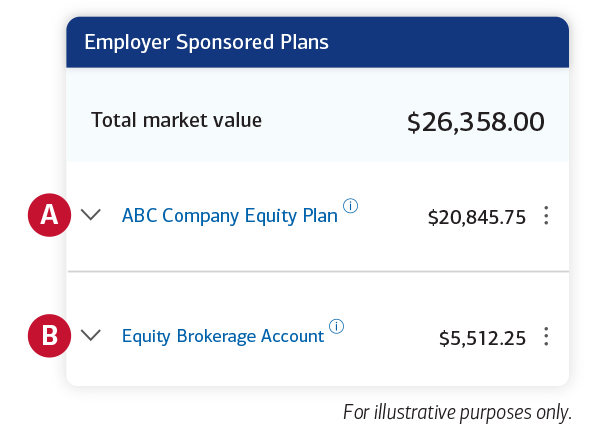
A. Your equity plan—Represents the pre-tax value of unvested and/or outstanding awards (awards not yet delivered, paid, or exercised).
B. Your brokerage account—Shows the value of shares of company stock and/or cash from vested and/or exercised awards.

*The app is designed to work with most mobile devices in most locations. Carrier fees may apply.
Any transactions in connection with your plan in your Merrill brokerage account are subject to the terms and conditions of that account. This material does not constitute an offer or invitation to buy any securities. Any offer to buy securities from your company would be made only by a prospectus in accordance with the Securities Act of 1933 as amended, and all applicable laws.